Getting Started
Repository Structure
The repository is organized into the following main folders:
MultiTaskBattery: Contains the core Python modules and classes needed to run tasks.
stimuli: Stores the stimuli used in experiments, organized into subfolders for each task (e.g., n_back for n-back tasks).
experiments: Stores experiment-specific folders, each containing the necessary configuration and scripts.
|-MultiTaskBattery: Main Python modules and classes
|-Stimuli: Stimuli used in the experiment
|  |-n_back: Stimuli for n_back tasks
|     |- ...
|-experiments: Folder for each experiment
|  |- example_experiment: Specific Experiment (example)
|     |-run.py: Your main Python program
|     |-constants.py: Constants for the experiment setup / scanner
|     |-run_files: Files specifying which tasks are done in which run (and which order)
|     |-task_files: Files specifying which trials are done for each task block
|     |-data: Data files for each subject
Implemented tasks
The tasks implemented in the repository are listed in the task_table.tsv file in the MultiTaskBattery folder. For more details, see the task descriptions.
Name |
Code |
Descriptive Name |
|---|---|---|
action_observation |
acva-acvk |
knot |
action_prediction |
action_prediction |
prediction |
affective |
affect |
affective |
auditory_narrative |
audnarr |
radio |
degraded_passage |
degpass |
listen |
demand_grid |
dmgrd |
grid |
faux_pas |
faux_pas |
faux pas |
finger_rhythmic |
fingrhytm |
finger_rhythmic |
finger_sequence |
fingseq |
finger_sequence |
flexion_extension |
flexexten |
toe |
frith_happe |
frith_happe |
triangle |
intact_passage |
intpass |
story_listen |
liking |
liking |
meeting |
movie |
mov |
movie |
n_back |
nbko |
memory |
nonword_reading |
nwdread |
nonword_reading |
oddball |
odbal |
oddball |
picture_sequence |
picture_sequence |
cartoon |
pong |
pong |
pong |
rest |
rest |
rest |
rmet |
rmet |
eyes |
semantic_prediction |
sempred |
complete |
semantic_switching |
semswit |
complete |
sensmot_control |
sensmotcontrol |
sensmot_control |
sentence_reading |
senread |
sentence_reading |
serial_reaction_time |
srt |
serial_reaction_time |
spatial_navigation |
spatialnav |
imagine |
story_sequence |
story_sequence |
story sequence |
strange_stories |
strange_stories |
relationship |
theory_of_mind |
tom |
story |
time_perception |
timeperc |
time_perception |
tongue_movement |
tongue |
tongue |
verb_generation |
vrbgn-wrdrd |
verb |
visual_search |
visrchsml |
search |
Run and Task Files
The experiment operates on two levels of control: run files and task files.
Run files (`run_xx.tsv`): These files specify the sequence of tasks within each run, including their order and timing. We recommend running each task for 30-40 seconds in a randomized order to ensure a balanced design.
Task files (`task_xx.tsv`): These files define the precise trial sequence for each task, including the stimuli and any relevant parameters.
Below are examples from the experiments/example_experiment/run_files and experiments/example_experiment/task_files folders illustrating the relationship between run and task files:

constants.py
The constants.py file in the experiments/example_experiment/ folder contains all the essential configurations required to set up and run the experiment. Below are the key components:
Experiment Name: The exp_name variable specifies the name of the experiment.
Response Keys: The response_keys variable defines the keys used for responses. Different configurations are provided for scanner-based and local(behavioral) setups.
Directory Paths: - exp_dir: Base directory for the experiment. - task_dir: Directory containing task files (task_xx.tsv). - run_dir: Directory containing run files (run_xx.tsv). - data_dir: Directory where data files are saved. - stim_dir: Directory storing stimuli for tasks.
Default Run File: The default_run_filename specifies the default run file (run_01.tsv) used in the experiment.
Eye-Tracking: The eye_tracker flag enables or disables eye tracking integration.
Debug Mode: Set debug to True to enable debugging features.
Screen Settings: The screen dictionary allows customization of the screen resolution (screen[‘size’]), full-screen mode (screen[‘fullscr’]), and display selection (screen[‘number’]).
run.py
The run.py script in the example_experiment/ folder serves as the main program for running the experiment. It controls the entire process, from initialization to data saving. Below are its key components:
Experiment Initialization: The Experiment object is created using configurations defined in constants.py.
Run Confirmation: A GUI prompts the user to confirm the run details. The GUI looks like this:

Run Initialization: The run file (run_xx.tsv) is loaded, and task objects are initialized based on the specified tasks and their sequence using the task files (task_xx.tsv).
Run Execution: Tasks are executed in the specified order and with the defined timing, as per the run file and using trial information from the task files.
Data Saving: Upon completion, the experimental data is saved in the data folder under a filename that includes the subject ID entered in the GUI.
Running the Example Experiment
The example_experiment includes the following tasks:
Finger Sequence
n-back
Demand Grid
Auditory Narrative
Sentence Reading
Verb Generation
Action Observation
Tongue Movement
Theory of Mind
Rest
To run the example_experiment, follow these steps:
Configure `constants.py`: Ensure the file experiments/example_experiment/constants.py is properly configured. Adjust settings such as screen resolution, response keys, and other parameters as needed to match your experiment’s requirements.
Generate run and task files: Run experiments/example_experiment/make_files.py to generate the run and task files. This creates the .tsv files in run_files/ and task_files/ that define the task order and trial sequences. The example experiment comes with pre-generated files, but for a new experiment you must run this step first.
Run the Experiment: Execute the run.py script located in experiments/example_experiment/run.py. The output files will be saved in the data folder, with filenames that include the subject ID provided during the experiment.
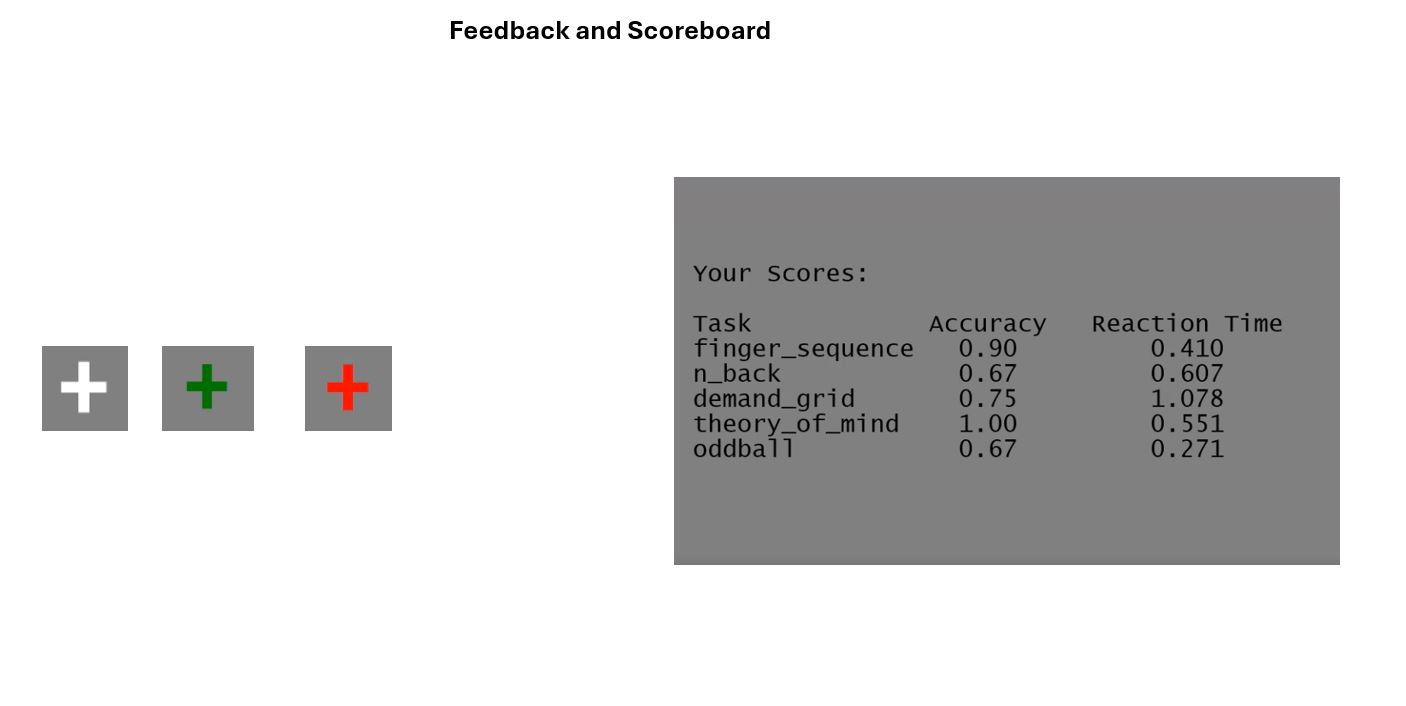
Feedback
For some tasks you will receive immediate feedback about your performance during the task. For correct responses, the fixation cross will turn green and when you made a mistake it will turn red. For other tasks you will see how you did at the end of the run. You will see a scoreboard with your performance on each task and a summary of your performance across all runs.